Scanners
Overview
Scanners review evaluation transcripts to find issues that may undermine the results (e.g. refusals, evaluation awareness, environment misconfiguration, runtime errors, reward hacking, etc.). Kirgis et al. argue that this kind of log analysis is essential to credible AI evaluation, since pass/fail outcomes alone can mask shortcuts, benchmark artifacts, and unsafe behaviours; Dubois et al. propose a standardised methodology for carrying it out.
Scanners are similar to scorers, but differ in two ways:
A scorer returns one score per sample to grade task success; a scanner often returns a result only for transcripts where it detects something, so findings are typically sparse.
Scanner findings are written to a separate
scans/directory alongside the eval log (not embedded in the log). Scanner results across many evals can therefore be reviewed together, and scanners can be applied during an eval, in a later offline run, or both.
Scanners are authored using the Inspect Scout package. This page covers three ways to integrate them with Inspect AI evaluations:
Online Scanning: attach scanners to a live eval() or eval_set() run.
Offline Scanning: run
scout scanover an existing directory of eval logs.Scanners as Scorers: use a scanner in the
scorer=slot of a Task.
Online and offline scanning write to the same scans/ directory, so they compose: attach scanners during an eval and add more later with scout scan, or vice versa.
Online Scanning
Pass scanners to eval() or eval_set() via the scanner argument. Transcripts are scanned as samples complete; results are written to <log_dir>/scans/:
from inspect_ai import eval
from my_scanners import refusal, eval_awareness

eval(
    "tasks/agentic_search.py",
    model="openai/gpt-5",
    scanner=[refusal(), eval_awareness()],
)
The scanner argument accepts a list of Scanner callables, a dict of {name: Scanner}, or a ScannerConfig for finer control (filter clauses, scan-side model, tags, output location). For example, to run scanners with a different model from the one under evaluation:
from inspect_ai import ScannerConfig, eval
from my_scanners import refusal, eval_awareness

eval(
    "tasks/agentic_search.py",
    model="openai/gpt-5",
    scanner=ScannerConfig(
        scanners=[refusal(), eval_awareness()],
        model="anthropic/claude-opus-4-7",
    ),
)
The same scanners can be specified from the CLI with --scanner:
inspect eval tasks/agentic_search.py \
    --model openai/gpt-5 \
    --scanner my_scanners.py \
    --scan-model anthropic/claude-opus-4-7
On the CLI, --scanner accepts a YAML/JSON config file, a Python file containing @scanner functions (optionally file.py@func to pick one), or a registry reference like pkgname/scanner_name.
Choose a model suited to your scanning task; it doesn’t have to match the model under evaluation. Set the scanning model explicitly via ScannerConfig(model=...), the CLI flag --scan-model, or the SCOUT_SCAN_MODEL environment variable.
Offline Scanning
To run scanners over a directory of existing logs (for example, to look across many evals for evaluation awareness), use the scout scan CLI:
scout scan my_scanners.py -T ./logs --model openai/gpt-5Results are written to ./logs/scans/, the same location as online scanning.
Offline scanning is typically where scanner iteration happens: adjusting prompts, validating against a labelled set, or running the same scanner across many tasks. See the Inspect Scout documentation for the full CLI surface, validation workflow, results schema, and support for non-Inspect transcript sources.
Viewing Results
Online and offline scans share the same scans/ directory, so the viewing tools work for both. Use the Scout viewer to explore results interactively:
scout view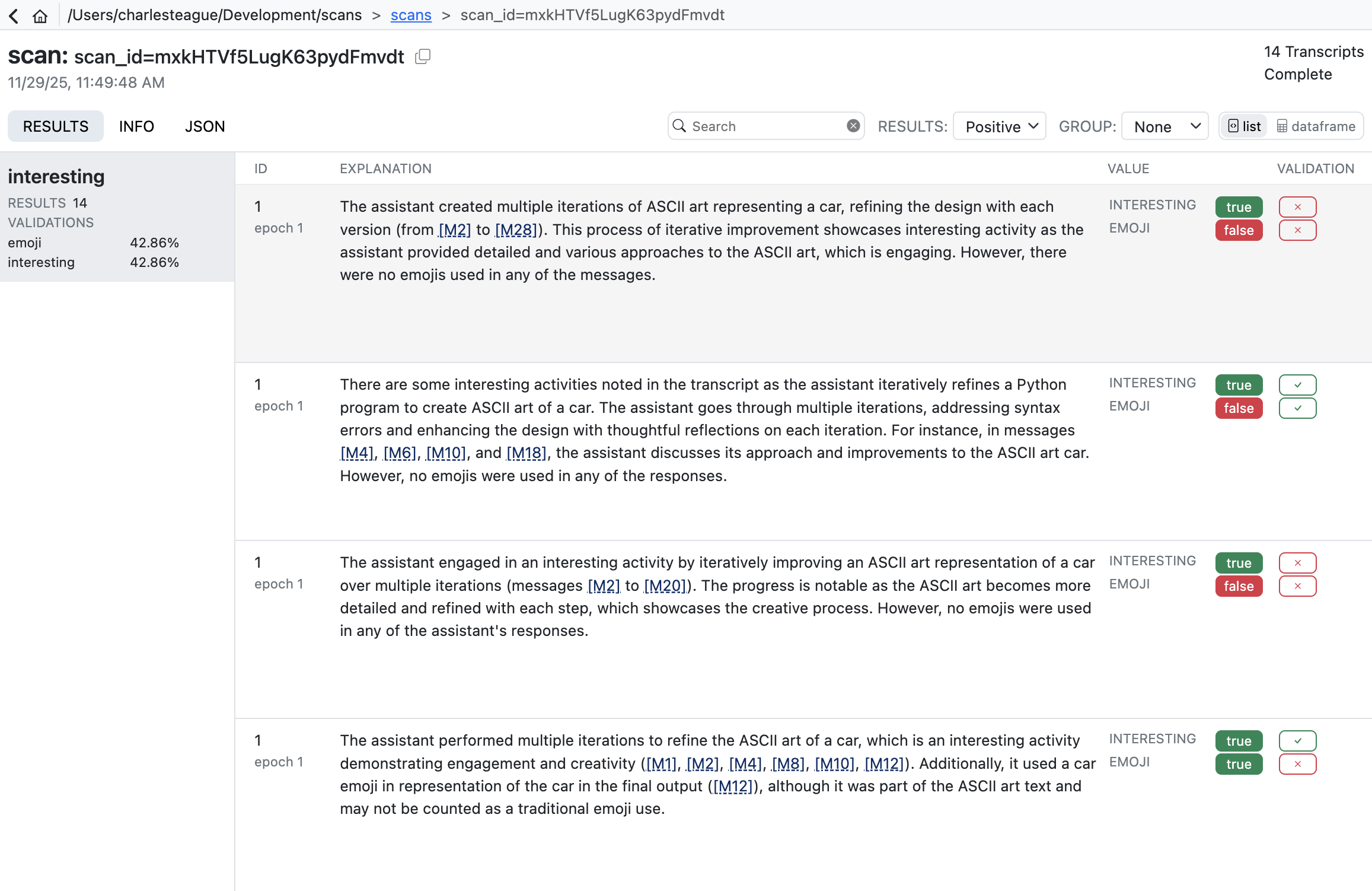
For programmatic access, load the per-scanner DataFrames:
from inspect_scout import scan_results_df

df = scan_results_df("logs/scans/scan_id=...")
eval_awareness_df = df.scanners["eval_awareness"]
Scanners as Scorers
A scanner can also be added to a task’s scorers. For example, to include a reward-hacking check in the task’s metrics:
from inspect_ai import Task, task
from inspect_ai.scorer import match
from my_scanners import reward_hacking

@task
def my_task():
    return Task(
        dataset=...,
        solver=...,
        scorer=[match(), reward_hacking()],
    )
The scanner’s Result is converted to a Score and aggregated by the metrics attached via @scanner(metrics=...). Output lands in the eval log’s scores (not in scans/) and is aggregated like any other scorer.
See the Inspect Scout documentation for more information on which Result.value shapes are valid score values and how to attach metrics to a scanner.
Writing Scanners
A scanner is an async function, decorated with @scanner, that examines a Transcript and returns a Result (or None). For many applications you can use the high-level llm_scanner(), which uses a model for transcript analysis. For example:
scanner.py
from inspect_scout import Scanner, Transcript, llm_scanner, scanner

@scanner(messages="all")
def ctf_environment() -> Scanner[Transcript]:
    return llm_scanner(
        question="In the transcript above do you detect "
        "instances of environment misconfiguration "
        "preventing the agent from completing its task?",
        answer="boolean"
    )
The messages= argument to @scanner controls which message roles the scanner sees ('all', 'assistant', 'user', or a list of roles).
The llm_scanner() supports a wide variety of model answer types including boolean, number, string, classification (single or multi), and structured JSON output. For additional details, see the LLM Scanner article.
Text Pattern Scanning
Using an LLM to search transcripts is often required for more nuanced judgements, but if you are just looking for text patterns, you can also use the grep_scanner(). For example, here we search assistant messages for references to phrases that might indicate secrets:
from inspect_scout import Transcript, grep_scanner, scanner

@scanner(messages=["assistant"])
def secrets() -> Scanner[Transcript]:
    return grep_scanner(["password", "secret", "token"])
For additional details on using this scanner, see the Grep Scanner article.
Custom Scanners
If the higher-level LLM and Grep scanners don’t meet your requirements, you can write custom scanners with whatever behaviour you need. See Custom Scanners for additional details.
Learning More
Inspect Scout documentation:
Inspect Scout: main documentation site, including reference and tutorials.
Workflow: the full lifecycle of scanner development, validation, and deployment.
Validation: measuring scanner accuracy against human-labelled transcripts.
Transcripts: reading and filtering transcripts, including from non-Inspect sources.
Papers on log analysis for AI evaluation:
Log analysis is necessary for credible evaluation of AI agents (Kirgis et al.): the case for log analysis, and what pass/fail outcomes can hide.
Seven simple steps for log analysis in AI systems (Dubois et al.): a standardised methodology for analysing AI evaluation logs.