# Parallelism – Inspect
## Overview
Inspect runs evaluations using a parallel async architecture, eagerly executing many samples in parallel while at the same time ensuring that resources aren’t over-saturated by enforcing various limits (e.g. maximum number of concurrent model connections, maximum number of subprocesses, etc.).
There are a progression of concurrency concerns, and while most evaluations can rely on the Inspect default behaviour, others will benefit from more customisation. Below we’ll cover the following:
1. Evaluating multiple models in parallel.
2. Evaluating multiple tasks in parallel.
3. Sandbox environment concurrency.
4. Writing parallel code in custom tools, solvers, and scorers.
> **NOTE:**
>
> For tuning model API connection limits and rate-limit handling (`max_connections`, adaptive connections, retries) see [Model Concurrency](./models-concurrency.html.md).
Inspect uses [asyncio](https://docs.python.org/3/library/asyncio.html) as its async backend by default, but can also be configured to run against [trio](https://trio.readthedocs.io/en/stable/). See the section on [Async Backends](#async-backends) for additional details.
## Multiple Models
You can evaluate multiple models in parallel by passing a list of models to the [eval()](./reference/inspect_ai.html.md#eval) function. For example:
``` python
eval("mathematics.py", model=[
"openai/gpt-4-turbo",
"anthropic/claude-3-opus-20240229",
"google/gemini-2.5-pro"
])
```
[](images/inspect-multiple-models.png)
Since each model provider has its own `max_connections` they don’t contend with each other for resources (see [Model Concurrency](./models-concurrency.html.md) for per-model tuning). If you need to evaluate multiple models, doing so concurrently is highly recommended.
If you want to specify multiple models when using the `--model` CLI argument or `INSPECT_EVAL_MODEL` environment variable, just separate the model names with commas. For example:
``` bash
INSPECT_EVAL_MODEL=openai/gpt-4-turbo,google/gemini-2.5-pro
```
## Multiple Tasks
By default, Inspect runs a single task at a time. This is because most tasks consist of 10 or more samples, which generally means that sample parallelism is enough to make full use of the `max_connections` defined for the active model.
If however, the number of samples per task is substantially lower than `max_connections` then you might benefit from running multiple tasks in parallel. You can do this via the `--max-tasks` CLI option or `max_tasks` parameter to the [eval()](./reference/inspect_ai.html.md#eval) function. For example, here we run all of the tasks in the current working directory with up to 5 tasks run in parallel:
``` bash
$ inspect eval . --max-tasks=5
```
Another common scenario is running the same task with variations of hyperparameters (e.g. prompts, generation config, etc.). For example:
``` python
tasks = [
Task(
dataset=csv_dataset("dataset.csv"),
solver=[system_message(SYSTEM_MESSAGE), generate()],
scorer=match(),
config=GenerateConfig(temperature=temperature),
)
for temperature in [0.5, 0.6, 0.7, 0.8, 0.9, 1]
]
eval(tasks, max_tasks=5)
```
It’s critical to reinforce that this will only provide a performance gain if the number of samples is very small. For example, if the dataset contains 10 samples and your `max_connections` is 10, there is no gain to be had by running tasks in parallel.
Note that you can combine parallel tasks with parallel models as follows:
``` python
eval(
tasks, # 6 tasks for various temperature values
model=["openai/gpt-4", "anthropic/claude-haiku-4-5"],
max_tasks=5,
)
```
This code will evaluate a total of 12 tasks (6 temperature variations against 2 models each) with up to 5 tasks run in parallel.
## Dataset Memory
When you run an evaluation, the full dataset of samples is loaded into memory. For most evaluations this is fine, but for very large datasets (e.g. hundreds of thousands of samples with long inputs) the memory footprint can become significant. The `--max-dataset-memory` option lets you set a per-task budget (in MB) for dataset sample data. When the estimated memory exceeds this budget, samples are automatically paged to a temporary file on disk and read back on demand as each sample is executed.
``` bash
$ inspect eval --model openai/gpt-4 --max-dataset-memory 512
```
Or equivalently in Python:
``` python
eval("task.py", model="openai/gpt-4", max_dataset_memory=512)
```
By default, no memory limit is applied and all samples remain in memory.
## Sandbox Environments
[Sandbox Environments](./sandboxing.html.md) (e.g. Docker containers) often allocate resources on a per-sample basis, and also make use of the Inspect [subprocess()](./reference/inspect_ai.util.html.md#subprocess) function for executing commands within the environment.
### Max Sandboxes
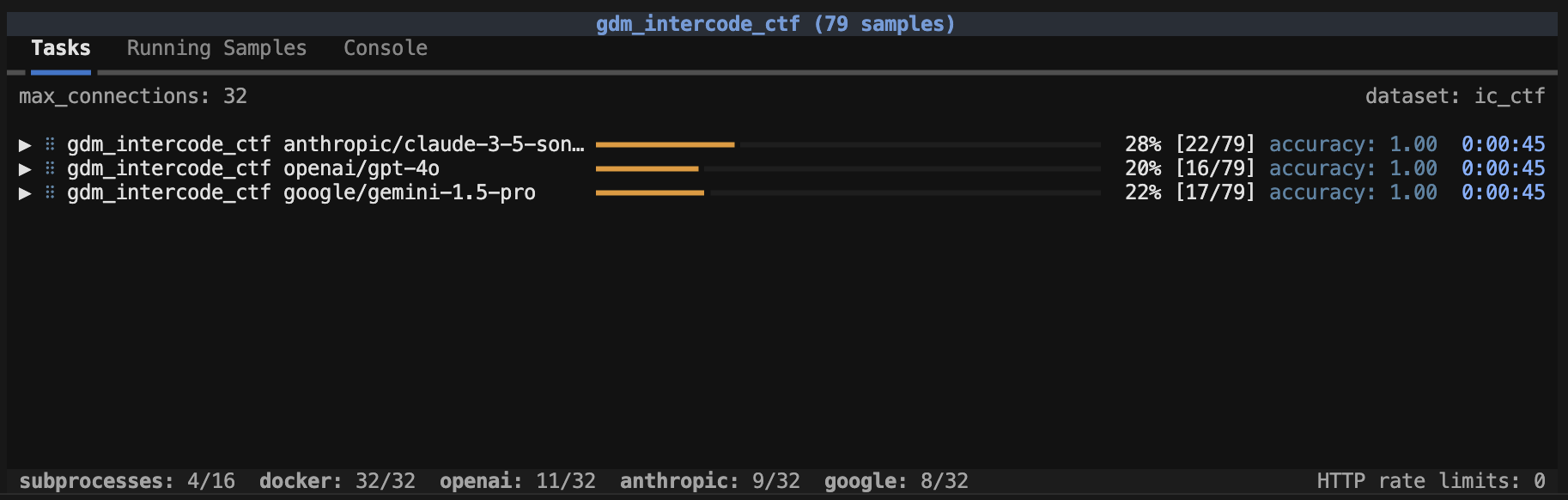
The `max_sandboxes` option determines how many sandboxes can be executed in parallel. Individual sandbox providers can establish their own default limits (for example, the Docker provider defaults to twice the number of processors available to the eval — which under a container CPU limit such as `docker --cpus` or a Kubernetes `limits.cpu` is the limit rather than the host’s processor count). You can modify this option as required, but be aware that container runtimes have resource limits, and pushing up against and beyond them can lead to instability and failed evaluations.
When a `max_sandboxes` is applied, an indicator at the bottom of the task status screen will be shown:
[](images/task-max-sandboxes.png)
Note that when `max_sandboxes` is applied this effectively creates a global `max_samples` limit that is equal to the `max_sandboxes`.
### Max Subprocesses
The `max_subprocesses` option determines how many subprocess calls can run in parallel. By default, this is the number of processors available to the eval (under a container CPU limit, that limit rather than the host’s processor count). Depending on the nature of execution done inside sandbox environments, you might benefit from increasing or decreasing `max_subprocesses`.
### Max Samples
Another consideration is `max_samples`, which is the maximum number of samples to run concurrently within a task. Larger numbers of concurrent samples will result in higher throughput, but will also result in completed samples being written less frequently to the log file, and consequently less total recovable samples in the case of an interrupted task.
By default, Inspect sets the value of `max_samples` to `max_connections + 1` (note that it would rarely make sense to set it *lower* than `max_connections`). The default `max_connections` is 10, which will typically result in samples being written to the log frequently. On the other hand, setting a very large `max_connections` (e.g. 100 `max_connections` for a dataset with 100 samples) may result in very few recoverable samples in the case of an interruption.
> **NOTE:**
>
> If your task involves tool calls and/or sandboxes, then you will likely want to set `max_samples` to greater than `max_connections`, as your samples will sometimes be calling the model (using up concurrent connections) and sometimes be executing code in the sandbox (using up concurrent subprocess calls). While running tasks you can see the utilization of connections and subprocesses in realtime and tune your `max_samples` accordingly.
## Solvers and Scorers
### REST APIs
It’s possible that your custom solvers, tools, or scorers will call other REST APIs. Two things to keep in mind when doing this are:
1. It’s critical that connections to other APIs use `async` HTTP APIs (i.e. the `httpx` module rather than the `requests` module). This is because Inspect’s parallelism relies on everything being `async`, so if you make a blocking HTTP call with `requests` it will actually hold up all of the rest of the work in the system!
2. As with model APIs, rate limits may be in play, so it’s important not to over-saturate these connections. Recall that Inspect runs all samples in parallel so if you have 500 samples and don’t do anything to limit concurrency, you will likely end up making hundreds of calls at a time to the API.
Here’s some (oversimplified) example code that illustrates how to call a REST API within an Inspect component. We use the `async` interface of the `httpx` module, and we use Inspect’s [concurrency()](./reference/inspect_ai.util.html.md#concurrency) function to limit simultaneous connections to 10:
``` python
import httpx
from inspect_ai.util import concurrency
from inspect_ai.solver import Generate, TaskState
client = httpx.AsyncClient()
async def solve(state: TaskState, generate: Generate):
...
# wrap the call to client.get() in an async concurrency
# block to limit simultaneous connections to 10
async with concurrency("my-rest-api", 10):
response = await client.get("https://example.com/api")
```
Note that we pass a name (“my-rest-api”) to the [concurrency()](./reference/inspect_ai.util.html.md#concurrency) function. This provides a named scope for managing concurrency for calls to that specific API/service.
### Parallel Code
Generally speaking, you should try to make all of the code you write within Inspect solvers, tools, and scorers as parallel as possible. The main idea is to eagerly post as much work as you can, and then allow the various concurrency gates described above to take care of not overloading remote APIs or local resources. There are two keys to writing parallel code:
1. Use `async` for all potentially expensive operations. If you are calling a remote API, use the `httpx.AsyncClient`. If you are running local code, use the [subprocess()](./reference/inspect_ai.util.html.md#subprocess) function described above.
2. If your `async` work can be parallelised, do it using `asyncio.gather()`. For example, if you are calling three different model APIs to score a task, you can call them all in parallel. Or if you need to retrieve 10 web pages you don’t need to do it in a loop—rather, you can fetch them all at once.
#### Model Requests
Let’s say you have a scorer that uses three different models to score based on majority vote. You could make all of the model API calls in parallel as follows:
``` python
from inspect_ai.model import get_model
models = [
get_model("openai/gpt-5"),
get_model("anthropic/claude-sonnet-4-5"),
get_model("mistral/mistral-large-latest")
]
output = "Output to be scored"
prompt = f"Could you please score the following output?\n\n{output}"
graders = [model.generate(prompt) for model in models]
grader_outputs = await asyncio.gather(*graders)
```
Note that we don’t await the call to `model.generate()` when building our list of graders. Rather the call to `asyncio.gather()` will await each of these requests and return when they have all completed. Inspect’s internal handling of `max_connections` for model APIs will throttle these requests, so there is no need to worry about how many you put in flight.
#### Web Requests
Here’s an example of using `asyncio.gather()` to parallelise web requests:
``` python
import asyncio
import httpx
client = httpx.AsyncClient()
pages = [
"https://www.openai.com",
"https://www.anthropic.com",
"https://www.google.com",
"https://mistral.ai/"
]
downloads = [client.get(page) for page in pages]
results = await asyncio.gather(*downloads)
```
Note that we don’t `await` the client requests when building up our list of `downloads`. Rather, we let `asyncio.gather()` await all of them, returning only when all of the results are available. Compared to looping over each page download this will execute much, much quicker. Note that if you are sending requests to a REST API that might have rate limits, you should consider wrapping your HTTP requests in a [concurrency()](./reference/inspect_ai.util.html.md#concurrency) block. For example:
``` python
from inspect_ai.util import concurrency
async def download(page):
async with concurrency("my-web-api", 2):
return await client.get(page)
downloads = [download(page) for page in pages]
results = await asyncio.gather(*downloads)
```
### Subprocesses
It’s possible that your custom solvers, tools, or scorers will need to launch child processes to perform various tasks. Subprocesses have similar considerations as calling APIs: you want to make sure that they don’t block the rest of the work in Inspect (so they should be invoked with `async`) and you also want to make sure they don’t provide *too much* concurrency (i.e. you wouldn’t want to launch 200 processes at once on a 4 core machine!)
To assist with this, Inspect provides the [subprocess()](./reference/inspect_ai.util.html.md#subprocess) function. This `async` function takes a command and arguments and invokes the specified command asynchronously, collecting and returning stdout and stderr. The [subprocess()](./reference/inspect_ai.util.html.md#subprocess) function also automatically limits concurrent child processes to the number of processors available to the eval (under a container CPU limit such as `docker --cpus` or a Kubernetes `limits.cpu`, that limit rather than the host’s processor count). Here’s an example from the implementation of a [list_files()](./reference/inspect_ai.tool.html.md#list_files) tool:
``` python
@tool
def list_files():
async def execute(dir: str):
"""List the files in a directory.
Args:
dir: Directory
Returns:
File listing of the directory
"""
result = await subprocess(["ls", dir])
if result.success:
return result.stdout
else:
raise ToolError(result.stderr)
return execute
```
The maximum number of concurrent subprocesses can be modified using the `--max-subprocesses` option. For example:
``` bash
$ inspect eval --model openai/gpt-4 --max-subprocesses 4
```
Note that if you need to execute computationally expensive code in an eval, you should always factor it into a call to [subprocess()](./reference/inspect_ai.util.html.md#subprocess) so that you get optimal concurrency and performance.
#### Timeouts
If you need to ensure that your subprocess runs for no longer than a specified interval, you can use the `timeout` option. For example:
``` python
try:
result = await subprocess(["ls", dir], timeout = 30)
except TimeoutError:
...
```
If a timeout occurs, then a `TimeoutError` will be thrown (which your code should generally handle in whatever manner is appropriate).
## Async Backends
Inspect asynchronous code is written using the [AnyIO](https://anyio.readthedocs.io/en/stable/) library, which is an async backend independent implementation of async primitives (e.g. tasks, synchronization, subprocesses, streams, etc.).
AnyIO in turn supports two backends: Python’s built-in [asyncio](https://docs.python.org/3/library/asyncio.html) library as well as the [Trio](https://trio.readthedocs.io/en/stable/) async framework. By default, Inspect uses asyncio and is compatible with user code that uses native asyncio functions.
### Using Trio
To configure Inspect to use Trio, set the `INSPECT_ASYNC_BACKEND` environment variable:
``` bash
export INSPECT_ASYNC_BACKEND=trio
inspect eval math.py
```
Note that there are some features of Inspect that do not yet work when using Trio, including:
1. Full screen task display uses the [textual](https://textual.textualize.io/) framework, which currently works only with asyncio. Inspect will automatically switch to “rich” task display (which is less interactive) when using Trio.
2. Interaction with AWS S3 (e.g. for log storage) uses the [s3fs](https://s3fs.readthedocs.io/en/latest/) package, which currently works only with asyncio.
3. The [Bedrock](./providers.html.md#aws-bedrock) and [Grok](./providers.html.md#grok) providers depend on asyncio so cannot be used with the Trio backend.
4. The `--acp-server` option (which exposes a running eval over the Agent Client Protocol so external editors can attach) depends on the asyncio-only `acp` library. Inspect raises a clear startup error if `--acp-server` is specified while the Trio backend is configured. Evals that don’t use `--acp-server` are unaffected and run normally under Trio.
### Portable Async
If you are writing async code in your Inspect solvers, tools, scorers, or extensions, you should whenever possible use the [AnyIO](https://anyio.readthedocs.io/en/stable/) library rather than asyncio. If you do this, your Inspect code will work correctly no matter what async backend is in use.
AnyIO implements Trio-like [structured concurrency](https://en.wikipedia.org/wiki/Structured_concurrency) (SC) on top of asyncio and works in harmony with the native SC of Trio itself.
To learn more about AnyIO see the following resources:
-
-